WeasyPrint is a free Python program that turns web pages, written in HTML and styled with CSS, into PDF files. You design the layout the way you would style a web page, and it produces the PDF. Many tools use it to create invoices, quotes, reports and letters from templates. It has been developed for about 15 years.
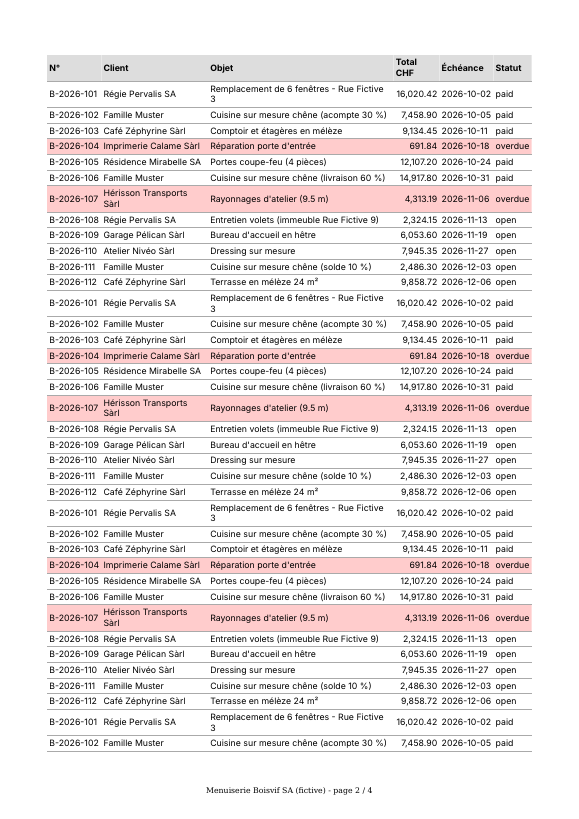
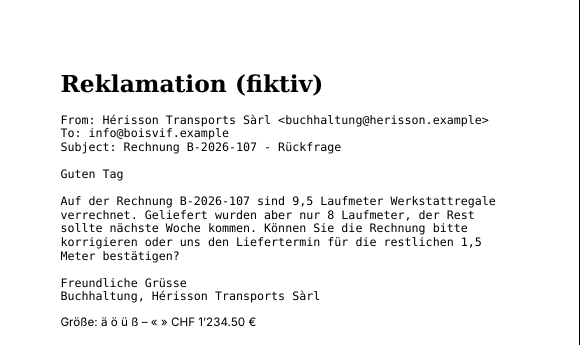
We installed version 70.0 in a clean Python environment; the install ran no extra scripts, and the first PDF came about 40 seconds after the download. We then used the data of Menuiserie Boisvif SA, the fictional joinery we use for our tests: an invoice list in French, repeated to fill four pages, with a repeating header row, shaded overdue invoices and a “page x of y” footer. We also made archive and accessible versions of the same PDF, turned a German customer email into a PDF and gave it a page whose image and stylesheet couldn’t be reached.
The output was right. The four pages took about 1.5 seconds. Every row was there, both overdue invoices were shaded, the header repeated on each page and the footer counted correctly. The amounts and accents stayed searchable as text. German umlauts, ß, Swiss apostrophes, guillemets and the euro sign all came out correctly, with the fonts embedded. When the image and stylesheet couldn’t load, it reported an error but still made the PDF.
Some limits. There is no screen to click through: someone has to write the HTML and CSS templates, or a developer has to connect it to your invoicing or accounting software. It doesn’t run JavaScript and doesn’t make QR bills. The archive (PDF/A) and accessible options ran without errors, but we didn’t check the files with a dedicated validator. And we tested on Linux only; Mac and Windows need extra system libraries.
WeasyPrint suits a small company with a developer or a web-savvy IT provider that wants to produce invoices, quotes or reports from its own data and keep everything on its own computers. It is less suitable if nobody can edit HTML templates.
Everything ran offline in our test. If a template points to images or fonts on the internet, they are fetched when the PDF is made, and left out if the connection fails, so put them inside the template. Its independent security score is 4 out of 10: read the project’s security notes before you process documents from people you don’t know.