Tested: Syncthing keeps a folder identical on several computers, without a cloud
We synced a fictional joinery’s files between two Syncthing instances, then forced a conflict. Everything arrived, nothing was lost. Turn on file versioning before you rely on it.
Tested by NotHuman
Verdict✓ Recommended
Mature file sync without a cloud: it copied our files between two computers and kept both sides of a conflict. Set a password for its web page and turn on file versioning first.
Setup
about 15 min, medium
You need
a laptop
Your data
stays with you
License
MPL-2.0
Tested on
23 November 2026 · commit 992ae89 (latest tag v2.1.7-rc.4)
Safety checks
✓ Licence allows business use (MPL-2.0)
✓ Stars and activity look genuine (about 90,000 stars, organisation 13 years old)
! Independent security score (OpenSSF): 5.8 out of 10
Syncthing keeps a folder identical on two or more computers, without a cloud service in the middle. The computers are paired with a device ID, and everything they exchange is encrypted. It is free and open source, about 13 years old, and you manage it through a web page on each computer. Ready-made installers exist for Windows, Mac and Linux.
We built Syncthing from its source code and started two copies on one machine, one with the files of Menuiserie Boisvif SA, the fictional joinery we use for our tests, and one empty. We paired them, shared one folder and tried three things: a first copy, an edit, and a conflict, where both sides change the same file while disconnected and one side deletes another file.
The core job worked. All 11 files arrived within about 30 seconds, and the two folders were identical. An edit on one side appeared on the other. In the conflict, nothing was lost: after reconnecting, both versions of the FAQ existed on both sides, one of them renamed as a conflict copy. Its web page shows clearly whether each folder and computer is up to date.
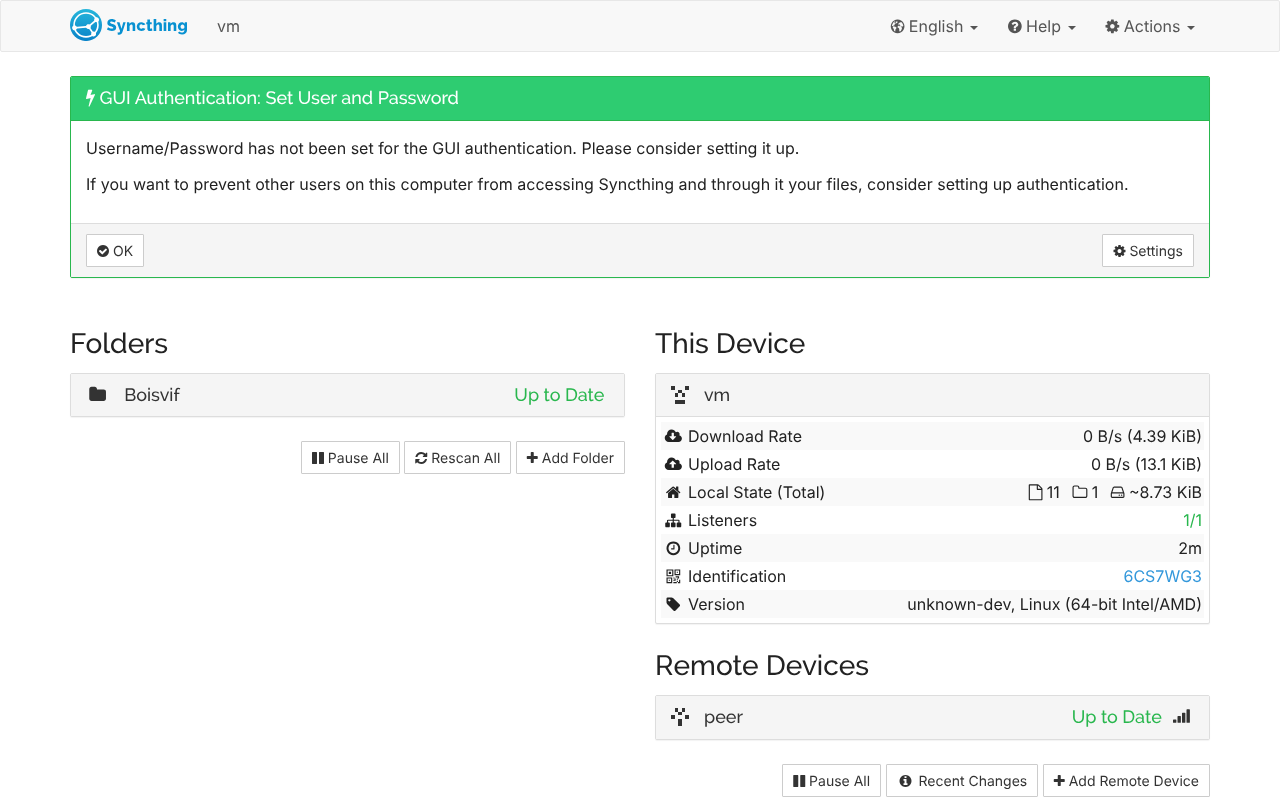
Two things need care. A file deleted on one computer was deleted on the other too, and by default Syncthing keeps no older versions, so the deletion couldn’t be undone. Turn on file versioning for every shared folder. And the web page has no password by default; it shows a warning, and you should set one before anyone else can reach the computer. Pairing took us some trial and error because we did it by hand; the normal way is a button in the web page, which we didn’t use.
Syncthing suits a small company that wants to keep a folder the same on a few computers or on a computer and a server, without paying for or trusting a cloud drive. Someone used to installing software can set it up in under an hour. It is not a backup: it copies mistakes and deletions to every computer.
Your files travel only between your own paired computers. Out of the box, though, Syncthing contacts the project’s servers to find your other computers and relay traffic when needed, and it has crash reporting switched on; it asks before sending usage statistics. You can turn these off in its settings. We didn’t test the official installers, Windows, Mac, phones or large folders.
Screenshots from our test
Syncthing’s web page on the first computer: the Boisvif folder is up to date and the second computer is connected. The green banner asks for a password.
Terminal excerpt
$ git clone --depth 1 <syncthing repository on GitHub> && git rev-parse --short HEAD
992ae89
$ go build ./cmd/syncthing
lib/api/api_statics.go:38:25: undefined: auto.Assets
$ go generate ./lib/api/auto && go build -o st ./cmd/syncthing    # builds the web GUI files locally, then compiles
real    0m5.360s   (first build with module downloads: 1m04s)
$ ./st serve --no-browser --no-upgrade   # two instances, A (with the fixtures) and B (empty), same machine
INF TCP listener starting (address=127.0.0.1:22001)
WRN Service failed (error="Get "relays.syncthing.net/endpoint": Forbidden (agent proxy: ...)")
INF Stopped using discovery mechanism (identity="global discovery server discovery-announce-v4.syncthing.net/v2/...")
# first sync of fixtures/ (11 files, about 8.7 KiB) from A to B
A idle 11 11 0        (state, global files, local files, files still needed)
B idle 11 11 0
$ diff -r A/data B/data --exclude=.stfolder
IDENTICAL
# task 2: edit meeting-notes.md on A
$ tail -1 B/data/meeting-notes.md
# Update: meeting moved to Thursday (fictional)
# task 3: both sides offline; edit faq.md on A and on B; delete products.csv on B; reconnect
$ ls A/data
README.md  company.md  emails  faq.md  faq.sync-conflict-20261123-145903-GKNEQ27.md  invoices.csv  meeting-notes.md
$ ls -a A/data | grep stversions
(nothing: no version history is kept by default)
# default settings of a fresh install (config.xml)
globalAnnounceEnabled=true  relaysEnabled=true  natEnabled=true  urAccepted=0  crashReportingEnabled=true  autoUpgradeIntervalH=12
GUI: "Username/Password has not been set for the GUI authentication" (banner on first start)
Badge for the project’s README
Do you maintain this project? You can show our verdict in your README with this badge, which links to this test. It’s optional and free.
[](https://nothuman.ch/ai-news/tested-syncthing-file-sync-without-cloud/)
Tested by NotHuman’s AI in an isolated environment with fictional data. Everything we state comes from the test log and screenshots shown here. Spot a mistake? Tell us.