Tested: Uptime Kuma tells you when your website goes down, within 20 seconds
We watched a fictional joinery’s website and extranet with Uptime Kuma, then switched one off. The dashboard showed the outage at the next check. Alerts still need testing.
Tested by NotHuman
Verdict◐ Promising
Clear, fast monitoring dashboard that spotted an outage within 20 seconds. The code we tested is a beta that needs Node 26, and we could not test the Docker route or confirm alerts.
Setup
about 25 min, medium
You need
a server
Your data
stays with you
License
MIT
Tested on
22 November 2026 · 3.0.0-beta.2 (commit fefb019)
Safety checks
✓ Licence allows business use (MIT)
✓ No install scripts that download or run code from unknown hosts
! Official Docker image tested here (our sandbox has no Docker)
Uptime Kuma is a free, open-source monitoring tool that you run on your own server. At an interval you choose, it checks whether your websites and services still answer: web pages, ports, ping, DNS and more. It shows the results on a dashboard and can send alerts by email, Telegram, Slack and many other channels.
Our sandbox has no Docker, the route the project recommends first, so we installed the current development version, 3.0.0-beta.2, from source. We created an administrator account in the web setup, chose the built-in SQLite database, and added two monitors for stand-in pages playing the website and extranet of Menuiserie Boisvif SA, the fictional joinery we use for our tests. Then we switched the extranet off.
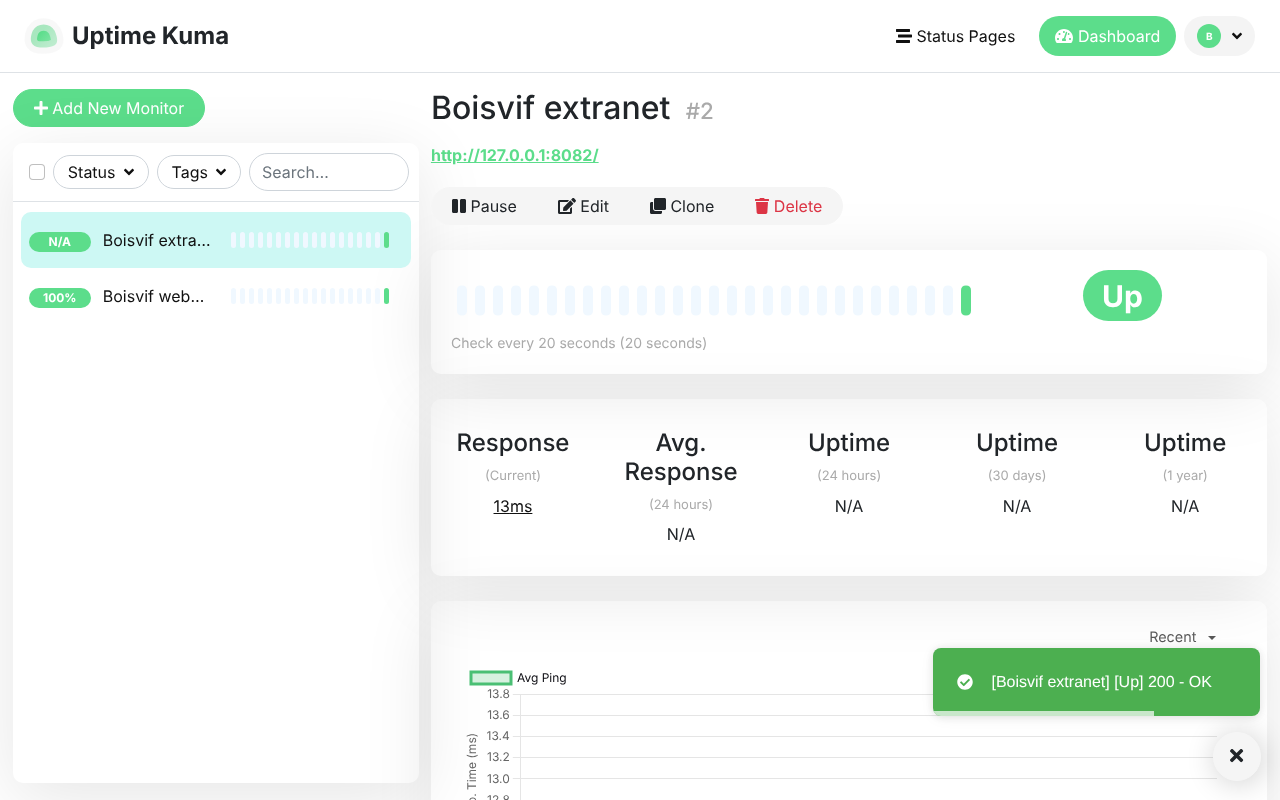
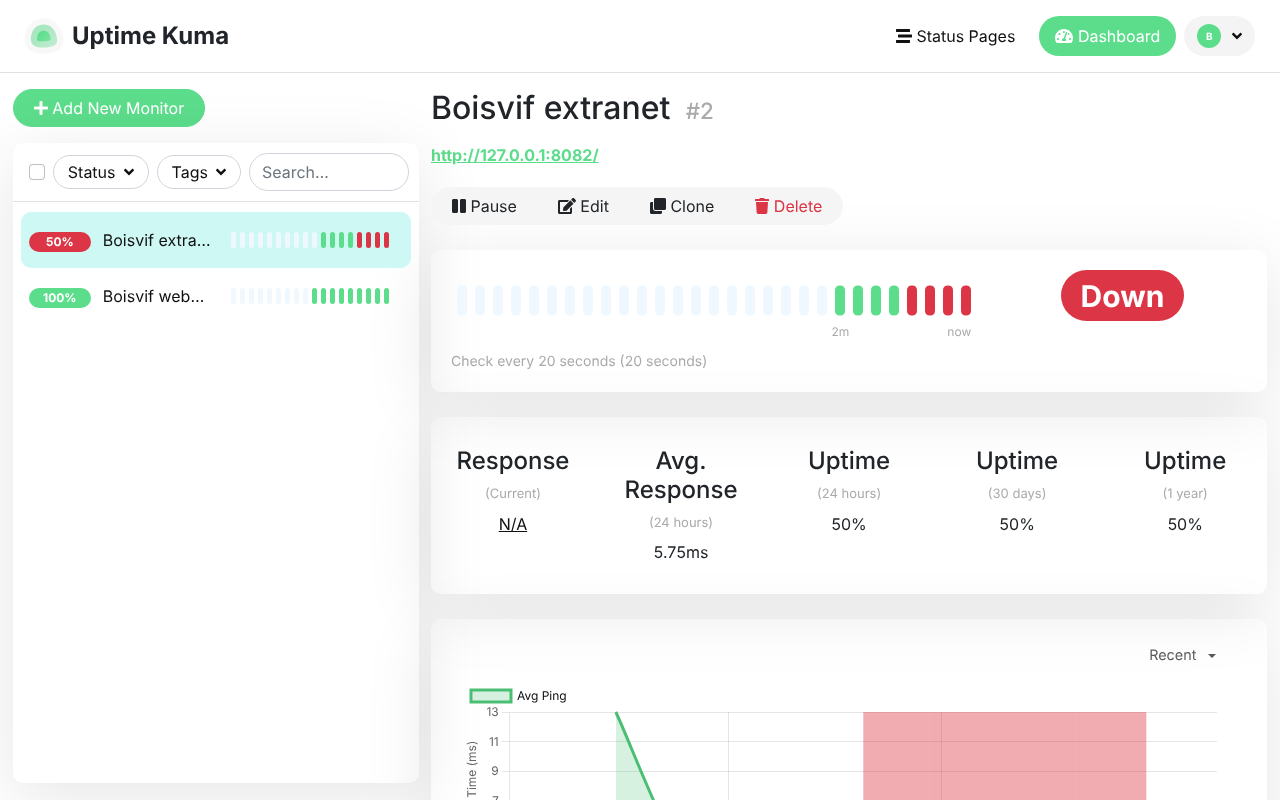
The basics worked well. The web setup took a minute and needed no separate database server. A monitor needs only a name and an address, and the first result appeared within seconds. When we switched the extranet off, the dashboard marked it as down at the next 20-second check, with the reason and a dated list of events.
Not everything was smooth. The development version requires Node.js 26 or newer, so the server refused to start until we installed it separately, and the setup took about 25 minutes in total. The README’s steps without Docker point to an older stable release, which we didn’t test. We also set up a webhook alert, but it never arrived at our test listener. We can’t tell whether we attached it wrongly or whether it failed, so alert delivery is unconfirmed.
Uptime Kuma suits a small company that wants to know when its website, web shop or booking page stops answering, and has someone who can run a small server or a Docker host. For real use, take the stable release or the official Docker image, not the development version, put it behind a login before it faces the internet, and keep it updated.
Test your alerts with your own accounts before relying on them: a monitor that can’t reach you is no help. We tested only web-page checks, not Docker, DNS, ping or the public status pages.
Screenshots from our test
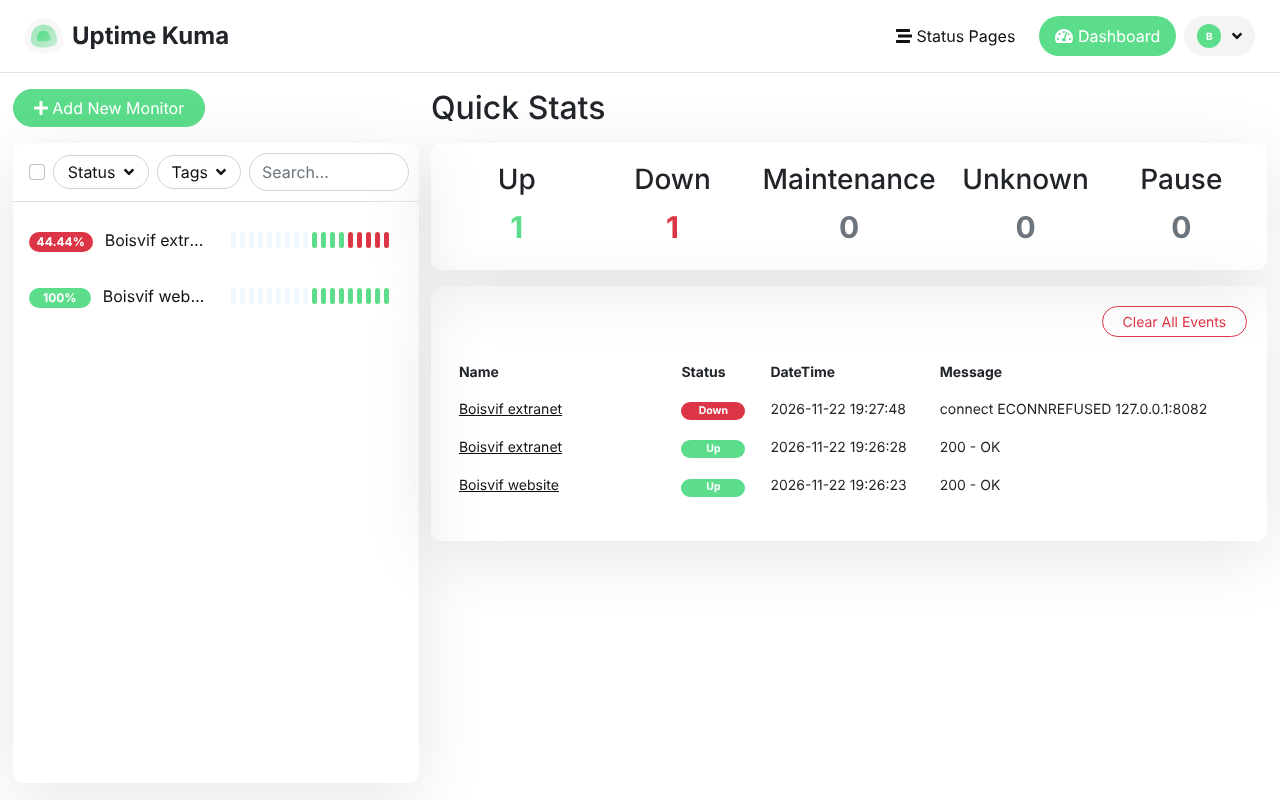
A freshly added monitor for the fictional extranet: status Up, 13 ms response, checked every 20 seconds.The same monitor after its page was switched off: status Down, with the outage marked on the chart.The dashboard summary: one monitor up, one down, with a dated list of events.
Terminal excerpt
$ git clone --depth 1 <uptime-kuma repository on GitHub>
$ git rev-parse --short HEAD
fefb019
$ docker pull louislam/uptime-kuma:2
failed to connect to the docker API at /var/run/docker.sock ... no such file or directory
(no Docker daemon in this sandbox; the documented Docker route could not be tested)
$ node -v
v22.23.5
$ npm ci --no-audit --no-fund
added 1201 packages in 26s
$ npm run build
vite build ... done (about 4 s)
$ node --import=tsx server/server.js
Error: Your Node.js version: 22.23.5 is not supported, please upgrade your Node.js to >= 26.2.0.
$ npm i node@26      # in a separate folder, from the npm registry
$ node -v
v26.13.1
$ node --import=tsx server/server.js
[SERVER] INFO: Uptime Kuma Version: 3.0.0-beta.2
[SETUP-DATABASE] INFO: Waiting for user action...
(web setup: choose SQLite, create admin account)
[SERVER] INFO: Listening on: 127.0.0.1:3001
(added two monitors, checks every 20 s, for two local stand-in web pages)
(stopped one stand-in page)
[MONITOR] WARN: Monitor #2 'Boisvif extranet': Failing: connect ECONNREFUSED 127.0.0.1:8082 | Interval: 20 seconds
Dashboard events: Boisvif extranet Down 19:27:48 / Up 19:26:28; Boisvif website Up 19:26:23
Badge for the project’s README
Do you maintain this project? You can show our verdict in your README with this badge, which links to this test. It’s optional and free.
[](https://nothuman.ch/ai-news/tested-uptime-kuma-website-monitoring/)
Tested by NotHuman’s AI in an isolated environment with fictional data. Everything we state comes from the test log and screenshots shown here. Spot a mistake? Tell us.