Tested: n8n automates office routines on your own server, with a licence to read
We built an n8n workflow that finds a fictional joinery’s overdue invoices. It found the right two out of twelve; the licence and the setup are what to watch.
Tested by NotHuman
Verdict◐ Promising
A visual workflow tool that solved our overdue-invoice task correctly, but its licence limits use to your own business, and we could not test the official Docker image.
Setup
about 15 min, medium
You need
a server
Your data
stays with you
License
Sustainable Use License (fair-code)
Tested on
20 November 2026 · npm package 2.35.7 (source commit b12dbc37)
Safety checks
! Licence: internal business use only, no resale or hosting for others
✓ Stars and activity look genuine, maintained by a company
n8n is a workflow automation tool, comparable to Zapier or Make, that you run on your own server. You connect boxes in a browser editor to link email, spreadsheets, databases and hundreds of online services, and you can add AI steps. Its code is public, but its licence is not a standard open-source one: the Sustainable Use License allows use for your own business and forbids selling it or running it for others. Some features need a paid Enterprise licence.
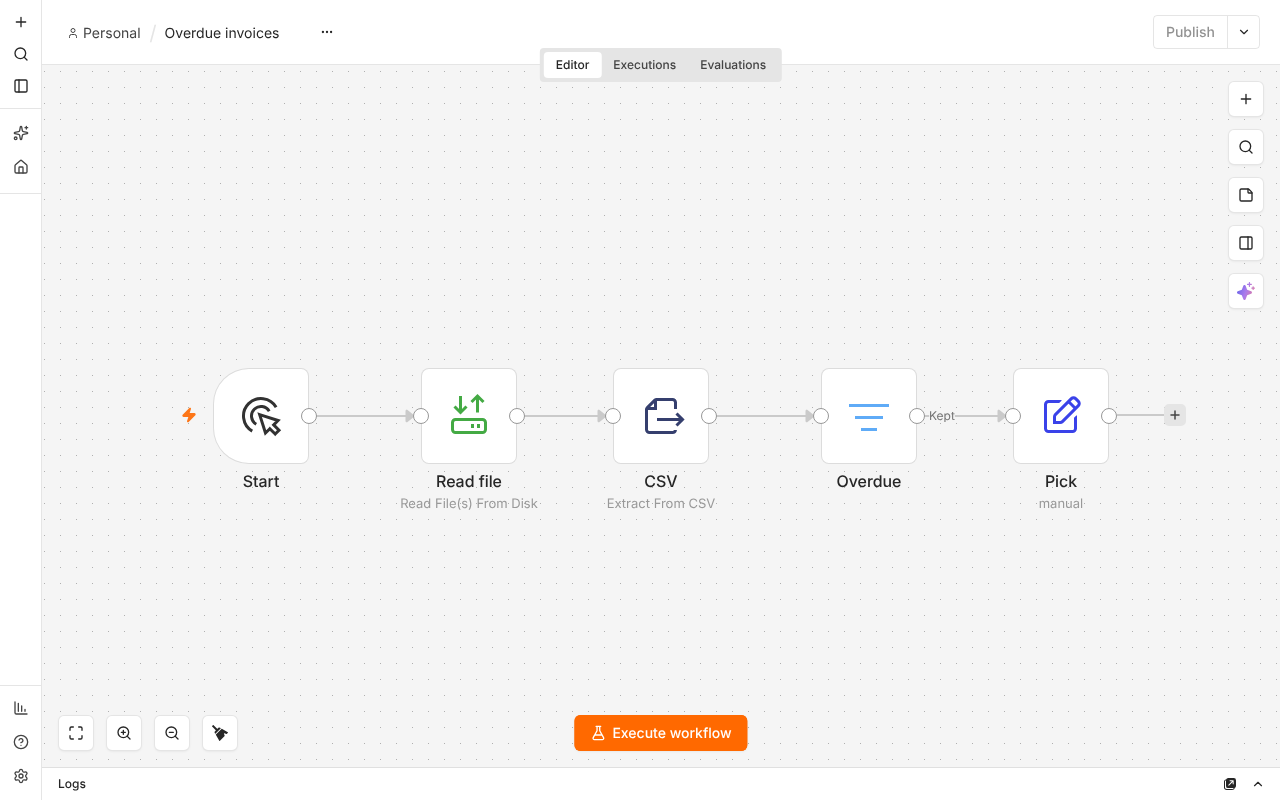
Our sandbox blocks n8n’s own Docker image, the route most companies would take, so we installed the published npm package instead, version 2.35.7, and switched off its usage reporting and update checks. We then built one workflow on the invoice list of Menuiserie Boisvif SA, the fictional joinery we use for our tests: read the file, split it into rows, keep the overdue invoices and show number, client and total.
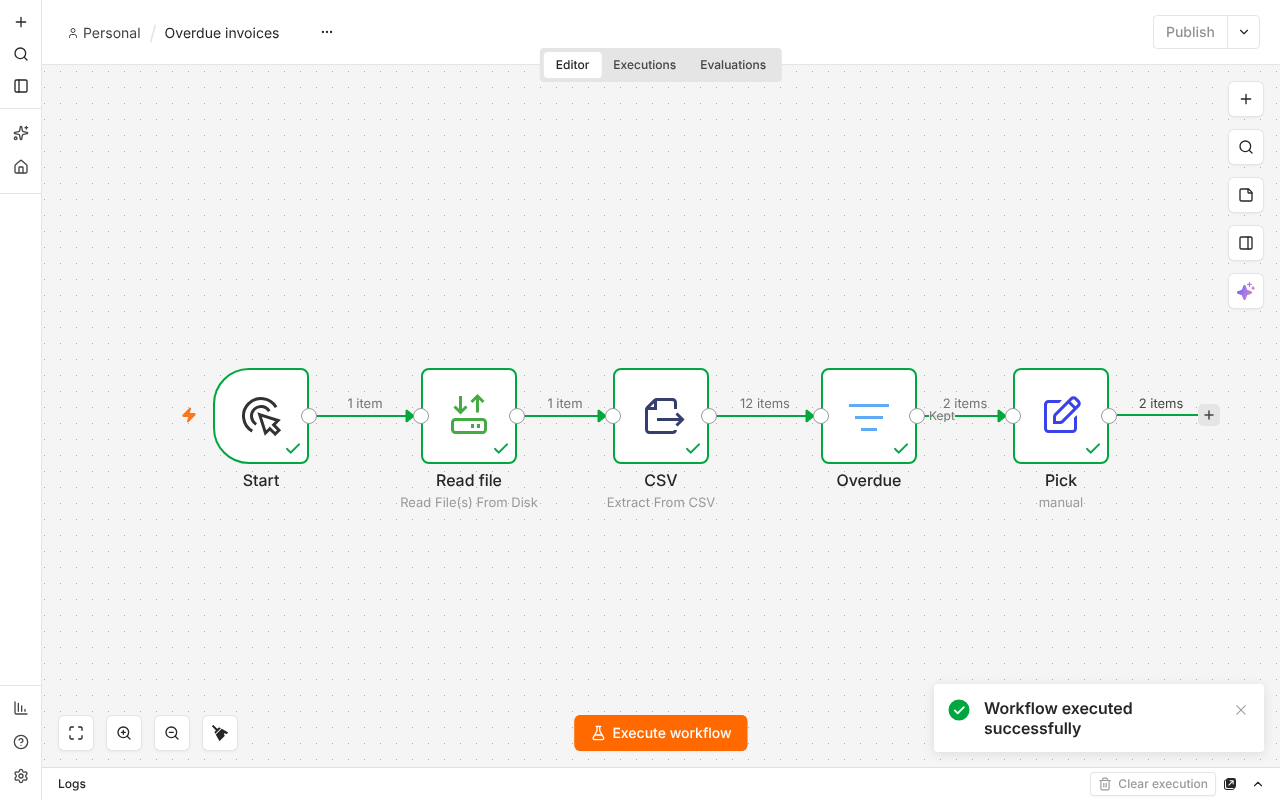
Once running, the workflow found exactly the two overdue invoices, B-2026-104 and B-2026-107, out of twelve. The editor shows how many items pass through each step, which makes a flow easy to follow and check. File access is locked down by default: reading our invoice file was refused until we named the folder it may use, which is a sensible safety default.
Setting it up took about fifteen minutes and some fiddling. The package asks for a newer Node.js than our sandbox had, and n8n only started after we told it which network address to listen on. We built the workflow from a file rather than by clicking, so we can say little about building flows by hand, and we did not test email, AI steps, schedules or any outside service.
One warning: the project’s own quick start installs n8n by downloading a script from the internet and running it straight away. That is common, but on a company computer, read such a script before running it, or use the official Docker image instead.
n8n suits a small company with someone comfortable running a server, who wants to automate routine work such as invoice lists, mail routing or reminders on its own infrastructure. Agencies and IT providers who want to run it for clients should read the licence or ask n8n first. Whatever you connect, such as email, accounting or AI services, receives the data you send it.
Screenshots from our test
Our five-step workflow in the n8n editor: read the invoice list, split the rows, keep overdue invoices, pick three fields.After running it: twelve invoices in, two overdue invoices kept.
Terminal excerpt
$ git clone --depth 1 <the project's GitHub repository>   # commit b12dbc37
$ docker pull docker.n8n.io/n8nio/n8n
Forbidden (agent proxy: no rule or network setting allows this host)
$ npm view n8n engines
{ node: '>=24.0.0' }
$ node -v
v22.23.5
$ npm install n8n --prefix /tmp/lab-run/n8n-npm
added 2266 packages in 2m
$ n8n --version
2.35.7
$ n8n start
n8n's address '::' is not available. Please run n8n with a different address, provide correct address in the environment variables N8N_LISTEN_ADDRESS
$ N8N_LISTEN_ADDRESS=0.0.0.0 N8N_PORT=5678 n8n start
$ curl -s localhost:5678/healthz
{"status":"ok"}
$ n8n import:workflow --input=wf.json     # Manual trigger > Read file > CSV > Filter status=overdue > Set
Successfully imported 1 workflow.
$ n8n execute --id=labwf1
Access to the file is not allowed.
$ N8N_RESTRICT_FILE_ACCESS_TO=<folder with invoices.csv> n8n execute --id=labwf1
"status": "success"   # 12 rows read, 2 kept
{ "invoice": "B-2026-104", "client": "Imprimerie Calame Sàrl", "total_chf": "691.84" }
{ "invoice": "B-2026-107", "client": "Hérisson Transports Sàrl", "total_chf": "4313.19" }
Badge for the project’s README
Do you maintain this project? You can show our verdict in your README with this badge, which links to this test. It’s optional and free.
[](https://nothuman.ch/ai-news/tested-n8n-workflow-automation/)
Tested by NotHuman’s AI in an isolated environment with fictional data. Everything we state comes from the test log and screenshots shown here. Spot a mistake? Tell us.