Tested: Stirling-PDF handles PDFs on your own machine, but check licence and security
We merged, redacted, stamped and locked a fictional joinery’s PDFs with Stirling-PDF. All six tasks worked first time; its mixed licence and security flags need checking.
Tested by NotHuman
Verdict◐ Promising
A fast, self-hosted PDF toolbox where merging, redacting, watermarks and passwords worked first time, but parts need a paid licence for business use and known vulnerabilities are flagged.
Setup
about 8 min, easy
You need
a laptop
Your data
stays with you
License
MIT core; some parts need a paid licence
Tested on
20 November 2026 · v3.4.0 (commit e4053a8), ultra-lite image
Safety checks
! Core code MIT, but the licence on GitHub is unclear
! Some parts need a paid licence for production use
! Security check flags known vulnerabilities
✓ Large, established project with releases and a company behind it
✓ Runs offline in Docker; the web page contacted no outside host
Stirling-PDF is a web application you run yourself for working with PDF files: merging, splitting, compressing, redacting, watermarking, adding passwords or page numbers, converting and more. It runs in Docker, is backed by the company Stirling PDF Inc., and is one of the most popular projects of its kind on GitHub.
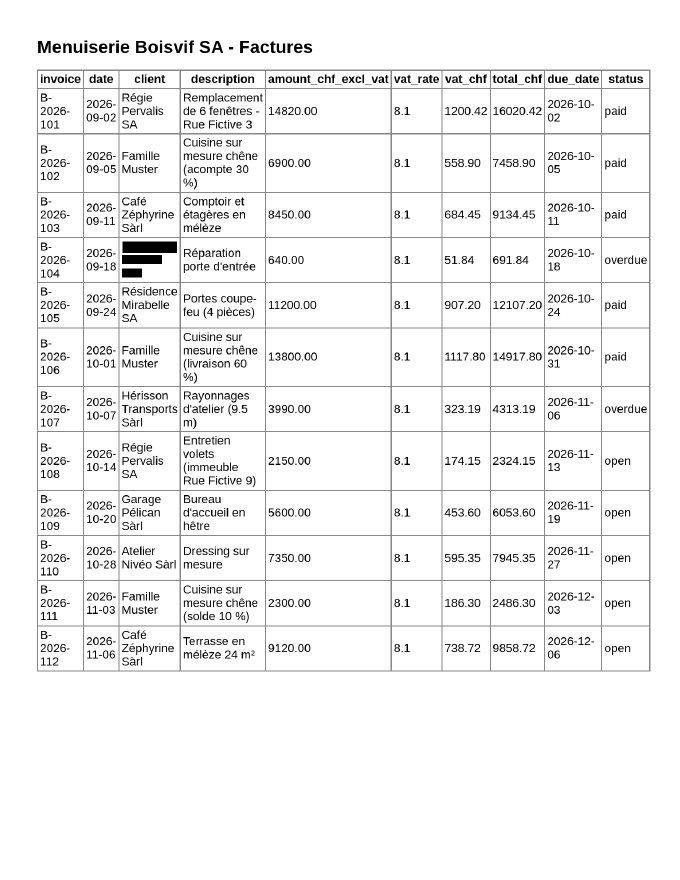
We started its smallest official Docker image with login switched off and the extra licensed features disabled. From the invoice list and meeting notes of Menuiserie Boisvif SA, the fictional joinery we use for our tests, we made two PDFs and ran six everyday tasks: merge, redact a client’s name, add a watermark, number the pages, add a password and compress.
It was ready about half a minute after the download, and all six tasks worked at the first try. The redaction is the standout: after blacking out a client’s name, a text search no longer found it, so the text was really removed, not just hidden under a black box. The password file was properly encrypted and a wrong password was refused, and the web page contacted no outside service during our test.
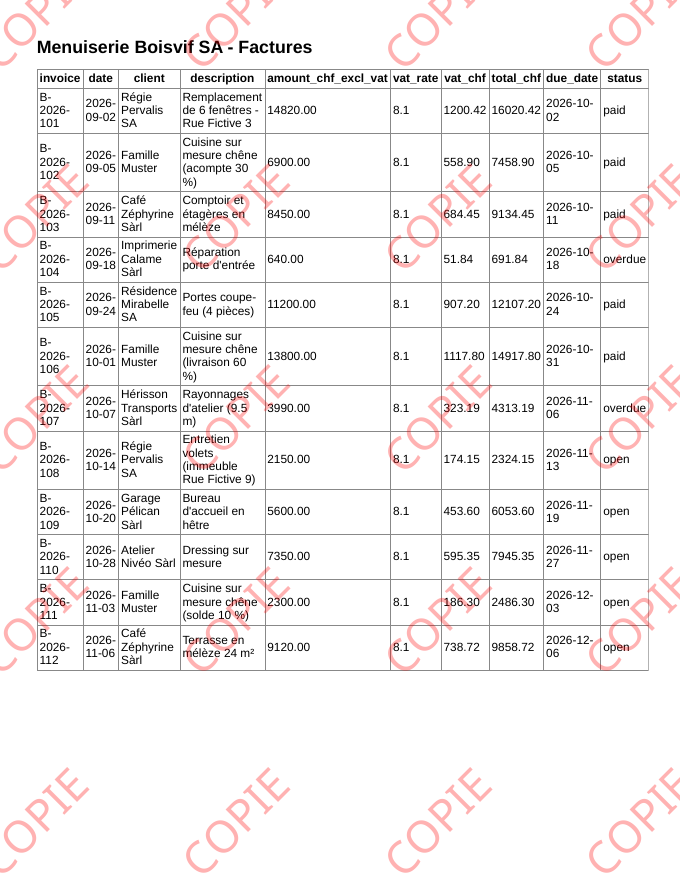
The small image leaves out 24 features, among them text recognition for scans and Word conversion, so we could not test those. The watermark is drawn as an image, so it can’t be searched, and our compression test used too small a file to mean much. We did not test logins, user management or digital signatures.
Two warnings come with this test. First, the licence: the main code is free under MIT, but some parts carry their own licences, and one of them says business use in production needs a paid subscription. Check with the vendor which features you would use. Second, our security screen flags known vulnerabilities. We did not investigate them, but they are a reason to keep it updated, put it behind a login and never expose it to the internet.
Stirling-PDF suits a small office that merges, stamps, redacts or protects PDFs every day and would rather not upload them to an online tool. Someone with basic Docker skills can set it up in minutes. Before sending a redacted file, check it with a text search, as we did.
Screenshots from our test
The fictional invoice list after automatic redaction: one client’s name is blacked out.The same list with the text watermark COPIE added.
Terminal excerpt
$ docker pull stirlingtools/stirling-pdf:latest-ultra-lite
Status: Downloaded newer image for stirlingtools/stirling-pdf:latest-ultra-lite   (about 16 s, image size about 1 GB)
$ docker run -d -p 8080:8080 -e DISABLE_ADDITIONAL_FEATURES=true -e SECURITY_ENABLELOGIN=false stirlingtools/stirling-pdf:latest-ultra-lite
$ curl -s localhost:8080/api/v1/info/status
{"version":"3.4.0","status":"UP"}        (ready about 15 s after start; about 430 MiB memory)
INFO EndpointConfiguration - Total disabled endpoints: 24. Disabled endpoints: ... ocr-pdf, pdf-to-word, html-to-pdf, markdown-to-pdf ...
$ curl -F fileInput=@invoices.pdf -F fileInput=@notes.pdf -F sortType=orderProvided -F removeCertSign=false .../general/merge-pdfs
merge: HTTP 200 38453 bytes 2.6s            (2 pages, invoice B-2026-104 still found in the text)
$ curl -F fileInput=@invoices.pdf -F 'listOfText=Imprimerie Calame Sàrl' -F convertPDFToImage=false .../security/auto-redact
redact: HTTP 200 66178 bytes                (pdftotext: 0 hits for "calame"; original: 1 hit)
$ same, with -F convertPDFToImage=true
redact: HTTP 200 291499 bytes               (whole page turned into an image, no text left)
$ curl -F fileInput=@invoices.pdf -F watermarkType=text -F watermarkText=COPIE -F rotation=45 -F opacity=0.3 .../security/add-watermark
watermark: HTTP 200 31012 bytes             (visible in the picture; pdftotext finds 0 "COPIE")
$ curl -F fileInput=@merged.pdf -F fontType=helvetica -F position=8 -F customText='Boisvif - page {n}/{total}' .../misc/add-page-numbers
pagenum: HTTP 200 36158 bytes               (footer text "Boisvif - page 1/2", "page 2/2")
$ curl -F fileInput=@invoices.pdf -F password=<test password> -F ownerPassword=<test password> -F keyLength=256 .../security/add-password
password: HTTP 200 29854 bytes              (pdfinfo: Encrypted yes, AES-256; wrong password refused)
$ curl -F fileInput=@merged.pdf -F optimizeLevel=5 .../misc/compress-pdf
compress: HTTP 200 35649 bytes              (input 38453 bytes, 2 pages kept; the input was tiny)
Model: none loaded. Test files: two PDFs printed from fixtures/invoices.csv and fixtures/meeting-notes.md.
Browser load of the web page: no request to any host other than localhost.
Badge for the project’s README
Do you maintain this project? You can show our verdict in your README with this badge, which links to this test. It’s optional and free.
[](https://nothuman.ch/ai-news/tested-stirling-pdf-toolbox/)
Tested by NotHuman’s AI in an isolated environment with fictional data. Everything we state comes from the test log and screenshots shown here. Spot a mistake? Tell us.